
Course software for Kit creators
Where your courses take root.
Cedarras builds courses on top of the Kit account you already run. Tag a subscriber and they are a student. Remove the tag and their access ends.
Your Kit tags are the enrollment Bring your own domain No second list to keep Students learn on their phone
Most course platforms make you keep a second list
Your audience lives in Kit. Your students live in the course platform. Every sale, refund, and cancellation has to reach both — and when one of them misses, somebody pays for a course they cannot open.
A course platform beside Kit
- Two lists of the same people, kept in step by hand.
- An import, an export, or a third tool wired between them.
- A cancellation in one place that never reaches the other.
- Enrollment you have to remember to revoke.
Cedarras on top of Kit
- One list. The Kit tag is the enrollment.
- Sell with a Kit product, add the tag with a Kit automation.
- The course opens on its own, within seconds.
- Take the tag away and access ends, progress kept.
From your audience to their next lesson
Nothing to move by hand, in either direction. Your audience flows into the course, and what they do there flows back out into Kit.
In Kit
Someone buys your product, joins a form, or finishes a sequence. Your automation adds a tag.
In Cedarras
That tag is connected to a course. The subscriber is a student, and the course opens.
As they learn
Lessons get marked complete. Cedarras tracks the percentage, the grade, and the finish date.
Back in Kit
A new tag on start, on a finished module, on completion — and the percentage and grade in your custom fields.
Powered by Kit’s powerful visual automation system
You already build automations in Kit. Cedarras uses them to run your course: enrollment when someone buys, follow-up when they finish, and encouragement pokes when they go quiet.
Kit can open your course a piece at a time, too. A tag can unlock the next module, so a Kit sequence releases one a week, or finishing one module opens the next. A lesson can be open for a set window, then close. And when a student finishes, they get a certificate.
See it
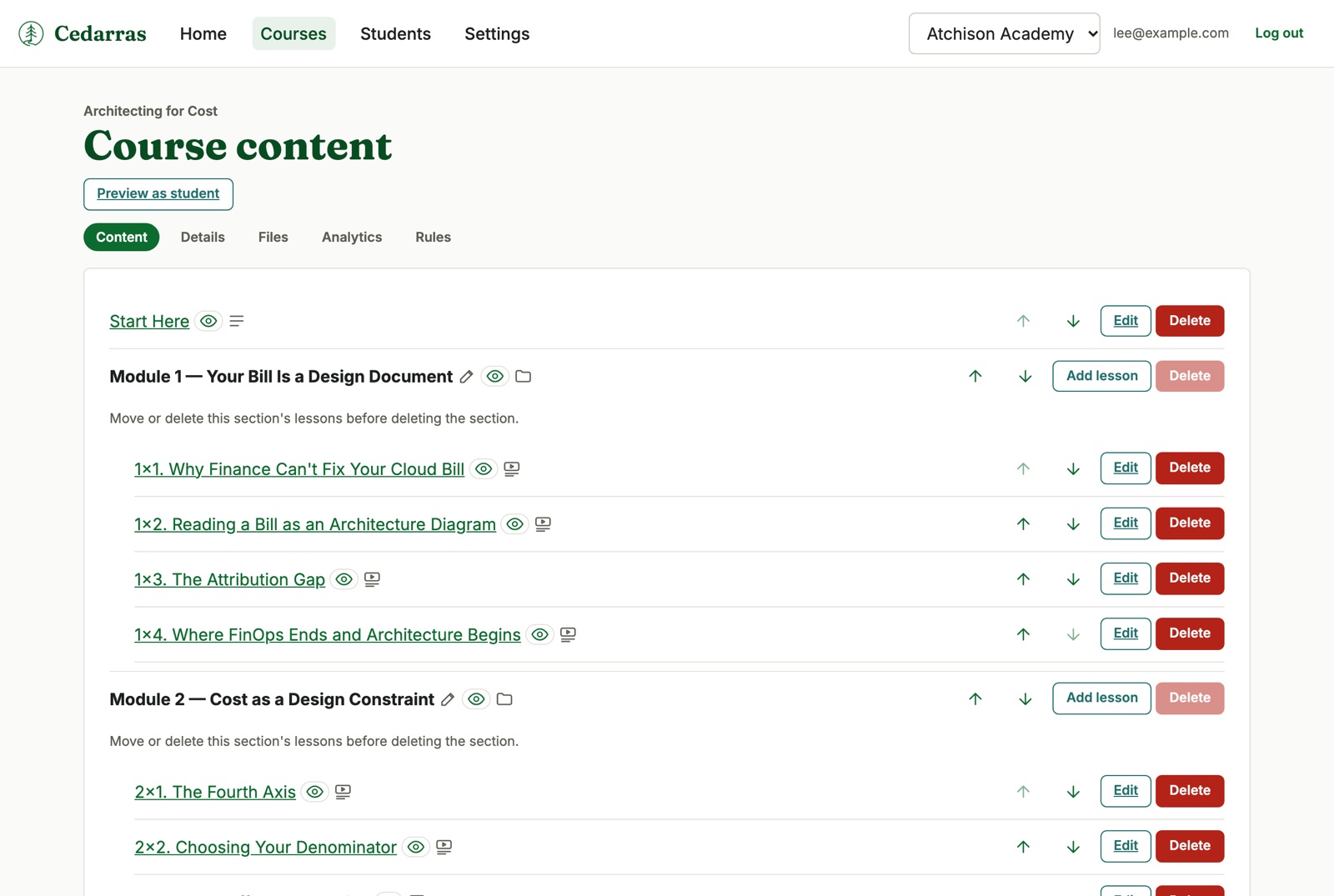
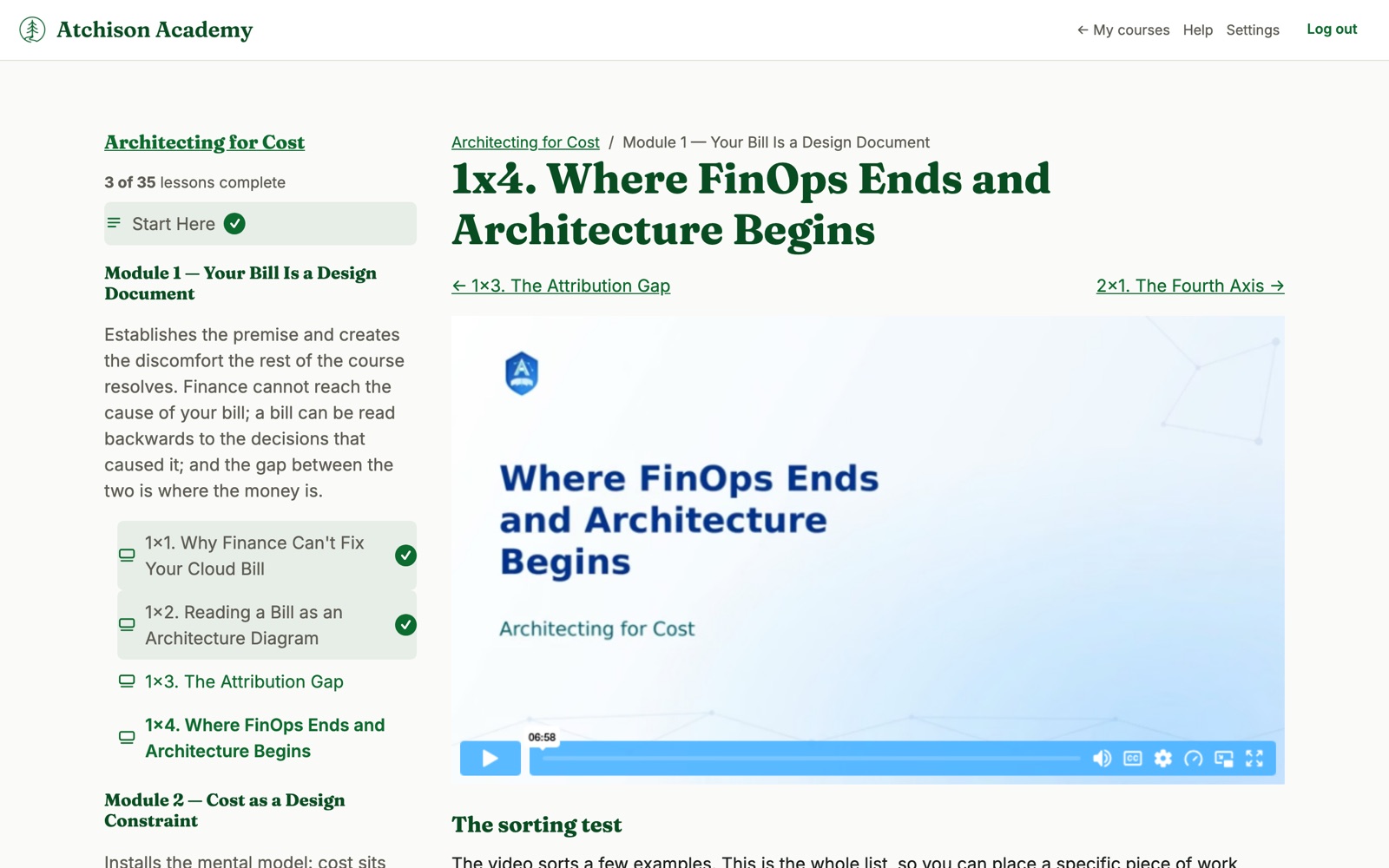
The course builder on your side, and the lesson page on your student’s.
Everything a real course needs
Not a folder of videos behind a password. Sections, lessons, files, quizzes, and a place of your own to put them.
A real course structure
Sections and lessons, in whatever order you want. Video, text, downloadable files, and quizzes.
Everything starts hidden, so you can build lesson eight while students are still working through lesson three.
Bring your assistant
Connect Claude or another AI assistant to Cedarras, and it can draft lessons, fix a typo across a module, or build a quiz.
It reaches your course content and nothing else. Student records stay out of it, and it cannot delete anything.
Drip and timed lessons
Open a lesson a set number of days after a student enrolls. Or let a Kit tag unlock it, so your Kit sequence decides when students get the next part.
A lesson can also open for a set window and then close. Weekly lessons, a limited-time bonus, a live cohort.
Completion certificates
Students who finish your course get a certificate with their name, your course, the date they finished, and your name and site icon. They can download it and share it from a link they control.
Finishing can also start a Kit automation. Send a congratulations email, suggest your next course or product, or add them to a newsletter or follow-up sequence.
Progress goes back to Kit
Cedarras can add a Kit tag when a student starts a course, finishes a module, or completes the whole thing, and write their percentage and grade into Kit custom fields.
Your automations take it from there. The congratulations email, the follow-up sequence, the offer for the next course.
Your domain, your name
Point your own domain at Cedarras and your students never see ours. Your site icon in the tab, your address in the bar, your colors on the page. We set up your site for secure student access and keep it that way. (See the padlock in the address bar? That means the connection is secure.)
Your domain shows your student experience only. Your course administration stays on Cedarras.
Start free
Launch your first course on the Free plan. Creator is $29 a month and Creator Pro is $59 a month, with two months free when you pay yearly. Agencies running several brands can talk to us.
A limit stops you adding. It never takes anything away from your students.
Start where your audience already is
Cedarras runs on Kit, so you need a Kit account. Getting started walks you through installing from the Kit App Store, which connects the two.